In this article
What job titles actually are
A job title in this platform is not just a display label — it is a structured configuration that links a team member to the specific service categories they are qualified to perform. When you create a job title like “HVAC Service Technician,” you are defining which services that role covers. When you assign that title to a team member, the platform knows exactly which jobs they are eligible to take.
This is what separates job titles from simply editing someone's display name. The title carries data about capability — and that data flows into dispatch, scheduling, and reporting.
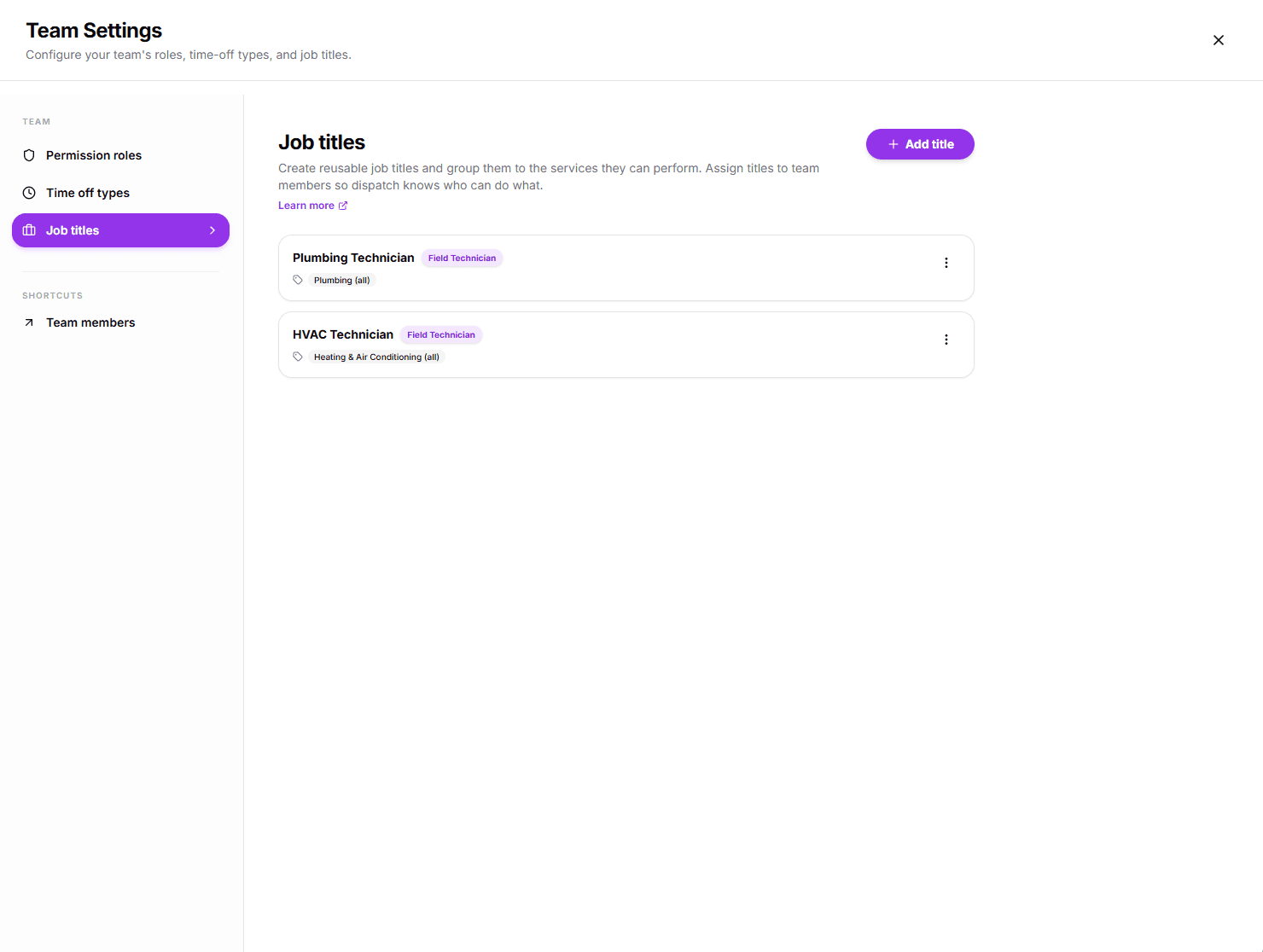
How titles connect to services
When you create or edit a job title, you can link it to one or more service categories. That linkage is the core mechanic. It means:
When an appointment is booked for a specific service, only technicians whose title covers that service are shown as available.
Dispatchers are never presented with a list of everyone on the team — only the people who are actually qualified.
If a technician is not linked to the required service through their title, they simply do not appear as an option for that job.
Titles vs. Roles
Job titles and roles are separate things. A role (Manager, Dispatcher, Technician) controls what someone can access in the platform. A job title controls which services they are matched to for dispatch. Both can be set independently on the same team member.
Examples by business type
The value of job titles scales with the complexity of your service offering. The more specialized your team, the more critical it becomes to route the right person to the right job. Here is how different business types use job titles in practice.
HVAC
Separate technicians who handle maintenance calls from those who run full system installations. A service tech troubleshoots existing equipment; an install tech commissions new units. Without titles, your dispatcher guesses — with titles, the right person is sent automatically.
Plumbing
A drain tech handles blockages and CCTV inspections. A service plumber covers repairs and fixture work. A master plumber handles complex reroutes and new builds. Each title maps to specific services so the right level of expertise always shows up.
Electrical
Compliance matters in electrical work. Job titles let you ensure licensed electricians are the only ones dispatched to jobs that legally require certification, while apprentices are routed to supervised or preparatory tasks.
Pest Control
Residential and commercial pest control often require different licensing, chemicals, and equipment. A termite specialist is not the same as a general pest tech. Titles prevent costly mismatches between job type and technician qualification.
Cleaning
A deep clean of a restaurant kitchen requires different skills and supplies than a standard domestic clean. Titles let you define those distinctions clearly so clients always get someone trained for what they actually booked.
General Trades
Even in single-trade businesses, titles create a visible hierarchy. A general tech handles standard jobs; a senior tech handles escalated or complex situations; a team lead oversees a crew. Dispatchers know at a glance who has capacity for what.
Multi-trade businesses benefit most
If your business handles more than one trade — say HVAC and plumbing — job titles are the single most important configuration you can set. Without them, every technician appears as a candidate for every job. With them, the dispatch system handles the matching automatically.
Fueling smart dispatch
Job title data flows directly into the scheduling and dispatch layer. When a dispatcher creates an appointment for a specific service, the platform filters the available team members against the service categories linked to each title. What the dispatcher sees is a clean, pre-filtered list — only qualified people, only those who are available.
What happens when an appointment is created
- 1The service category required for the appointment is identified.
- 2The platform looks up which job titles are linked to that service category.
- 3Team members assigned one of those titles are marked as eligible.
- 4The eligible list is then filtered by availability to produce the final dispatch options.
Error prevention
The system prevents scheduling errors by filtering out technicians whose title does not cover the required service. A plumbing job will never suggest an HVAC-only technician as an option.
Specialist prioritization
When multiple technicians qualify, dispatchers can quickly identify specialists — those whose title is specifically built for that job type — versus generalists who technically qualify but are not the ideal match.
First-time fix rate
Sending the right person the first time reduces callbacks, rework, and client frustration. Job titles are the structural foundation that makes this possible at scale.
Other use cases
Dispatch is the most powerful application of job titles, but it is not the only one. They create value across several other areas of how your team operates.
Career progression and hierarchy
Job titles give your team a visible ladder. "Junior Technician" → "Senior Technician" → "Lead Technician" is immediately meaningful to everyone in the organization. When a team member gets promoted, changing their title signals that progression clearly — without needing to change their role or permissions.
Team composition at a glance
Managers can scan the team list and immediately understand what the organization looks like — how many HVAC techs versus plumbing techs, how many senior versus junior staff. This visibility helps with hiring decisions and workload planning.
Schedule board clarity
On the schedule board, seeing a technician’s title alongside their name removes ambiguity. A dispatcher looking at a busy day can quickly see which specialists have gaps versus which generalists are available — without needing to remember each person’s skill set from memory.
Client-facing professionalism
When a technician is assigned to a job, their title can be visible to the client. “Senior HVAC Technician” communicates expertise and builds confidence in your service before the technician even arrives. It’s a small detail that contributes to how professional your operation appears.
Next: set up your titles
Now that you understand what job titles do, the next step is creating them for your team and linking each one to the right service categories. The setup takes a few minutes and the dispatch system starts working immediately.
Ready to configure your team?
The Managing Job Titles guide walks you through creating titles, linking them to service categories, and assigning them to team members step by step.
View guide: Managing Job Titles